Google adsense

Search

Wednesday, March 23, 2011

JavaScript: Enum in JavaScript

Example 1:

var Days = {"sunday" : 0, "monday" : 1, "tuesday" : 3, "wednesday" : 4, "thursday" : 5, "friday" : 6, "saturday" : 7};

document.write(Days.friday);


Example 2:

function Enum() {}
Enum.ColorType = {red:0, blue:1, green:2}
document.write(Enum.ColorType.blue);


Example 3:

var enumObj = new Object();
enumObj.fontSize = {small:10, medium:12, large:14}
document.write(enumObj.fontSize.small);


Thanks,

InfoSource: http://programming.top54u.com/post/Creating-Javascript-Enum-values.aspx

Friday, March 18, 2011

JavaScript: jQuery loading remote/external javascript files using getScript()

FMM: For my memory

$.ajaxSetup({async: false});

$.getScript(MVCRoot+fileName+'.js');

$.ajaxSetup({async: true});


FYI

Thanks,

Info Source: http://colourgray.wordpress.com/2008/09/22/jquery-loading-external-javascript-files-using-getscript/

Tuesday, March 15, 2011

JavaScript: Functions

FMM: For my memory

substring() --- string.substring(from, to);
toUpperCase() --- string.toUpperCase();
toLowerCase() --- string.toLowerCase();

FYI

Wednesday, March 2, 2011

C#: Evaluate C# Code (Eval Function)

It is function to give you a lot of chance such as convert string to object.

// Eval > Evaluates C# sourcelanguage

public static object Eval(string sCSCode) {

CSharpCodeProvider c = new CSharpCodeProvider();
ICodeCompiler icc = c.CreateCompiler();
CompilerParameters cp = new CompilerParameters();

cp.ReferencedAssemblies.Add("system.dll");
cp.ReferencedAssemblies.Add("system.xml.dll");
cp.ReferencedAssemblies.Add("system.data.dll");
cp.ReferencedAssemblies.Add("system.windows.forms.dll");
cp.ReferencedAssemblies.Add("system.drawing.dll");

cp.CompilerOptions = "/t:library";
cp.GenerateInMemory = true;

StringBuilder sb = new StringBuilder("");
sb.Append("using System;\n" );
sb.Append("using System.Xml;\n");
sb.Append("using System.Data;\n");
sb.Append("using System.Data.SqlClient;\n");
sb.Append("using System.Windows.Forms;\n");
sb.Append("using System.Drawing;\n");

sb.Append("namespace CSCodeEvaler{ \n");
sb.Append("public class CSCodeEvaler{ \n");
sb.Append("public object EvalCode(){\n");
sb.Append("return "+sCSCode+"; \n");
sb.Append("} \n");
sb.Append("} \n");
sb.Append("}\n");

CompilerResults cr = icc.CompileAssemblyFromSource(cp, sb.ToString());
if( cr.Errors.Count > 0 ){
MessageBox.Show("ERROR: " + cr.Errors[0].ErrorText,
"Error evaluating cs code", MessageBoxButtons.OK,
MessageBoxIcon.Error );
return null;
}

System.Reflection.Assembly a = cr.CompiledAssembly;
object o = a.CreateInstance("CSCodeEvaler.CSCodeEvaler");

Type t = o.GetType();
MethodInfo mi = t.GetMethod("EvalCode");

object s = mi.Invoke(o, null);
return s;

}

Thanks,
Info source: http://www.codeproject.com/KB/cs/evalcscode.aspx

Thursday, October 28, 2010

First step for newbie on Flash

This tutorials for only newbie on flash. It is how to create the effect (fade in) of object. I think the principle of flash UI (user interface) workspace that create the object > convert to movie clip> convert to graphic > then make the effect on own created graphic object. Maybe, It’s not.

Энэ хичээл нь зөвхөн flash эхлэн суралцагчидад зориулагдсан. Обьектонд эффект яаж оруулах вэ. Миний бодлоор flash дээр ажиллах зарчим нь эхлээд обьектоо үүсгэх > movie clip руу хөрвүүлэх > graphic руу хөрвүүлэх > тэгээд graphic дээрээ эффектээ оруулж өгөх юм. Магадгүй, энэ биш ч байж болно.


Create new Flash Document. Select the File > New (keyboard shortcut Ctrl+N)

Workspace

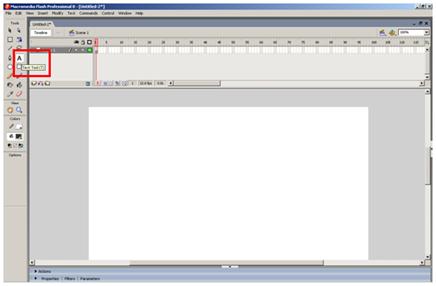
Select the Text Tool (keyboard shortcut T) on Tools bar

Drag and Drop on the workspace

Write the text like Hello World!

Select the selectrion Tool (keyboard shortcut V) on Tools bar

Right click on the your text and click the Convert to Symbol…

Show the Convert to Symbol dialogbox. Select the Movie clip from Type then set the name that mc_helloworld. Ok click

Double click on the your text

Show it after double click.

Rigth click on the your text and click the Convert to Symbol…

Show the Convert to Symbol dialogbox. Select the Graphic from Type then set the name that gc_helloworld. Ok click

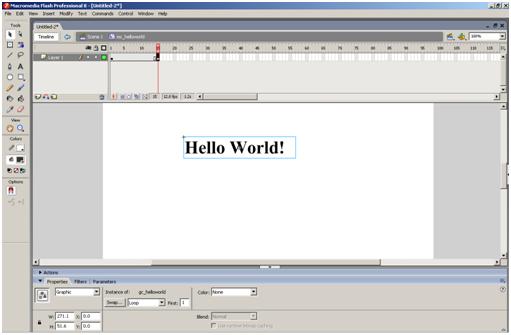
Select the first keyframe of Layer 1 on Timeline bar. Then press the F5 on keyboard to frame 15.

Rigth click on frame 15 and click the Insert Keyframe.

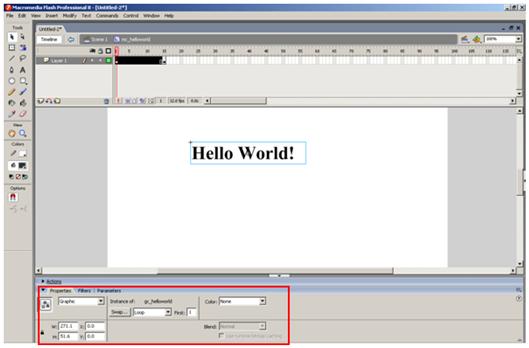
Click the frame 1 and select the your text. Then show the object properties dialogbox (click the Properties on bottom or from Window menu)

Select the Alpha of Color property and set the 0 (zero).

Select the frame 15 select the your text. Then show the object properties dialogbox (click the Properties on bottom or from Window menu)
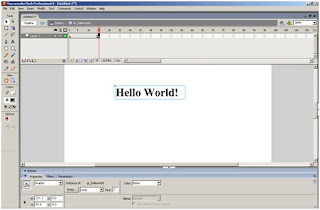
Select the Alpha of Color property and set the 100.

Rigth click the frame 1 and click Create Motion Tween.

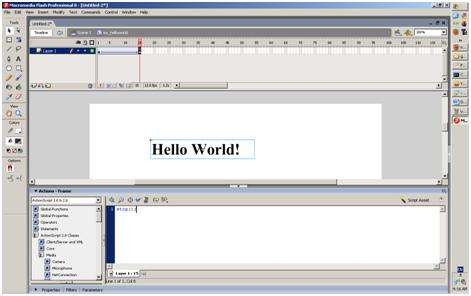
Rigth click the frame 15 and click Actions.

Write the stop();
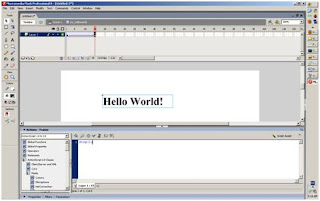
Now, Run the movie. Select the Control > Test Movie (keyboard shortcut Ctrl+Enter).

You're done. Good Luck! :)

Thanks,

Monday, September 20, 2010

C#: Forms relationship

Calling a form method from another form. You can solved it, using the Window.Owner property. But only top-level controls can have an owner.

Нэг формоос нөгөө формын функцийг дуудах. Нэг формоос өөр формыг дуудахдаа ShowDialog функц ашигласанаар хоёр форм хоорондоо харилцаа холбоотой болдог. Харин Show функээр дуудвал хоёр форм хоорондоо холбоогүй дуудагддаг. Show функцээр дуудсан үед тухайн хоёр формын холбоог Window.Owner property -г хэрэглэн үүсгэж болно.

Example:

//Form1 coding

private void button1_Click(object sender, EventArgs e)
{
this.label1.Text = "Hello World!";
}

public void updateForm()
{
button1_Click(this.button1, null);
}

private void button2_Click(object sender, EventArgs e)
{
Form2 f2 = new Form2();
f2.Owner = this;
//f2.frmTemp = this;
f2.Show();
}

//Form2 coding
//public Form frmTemp;

private void button1_Click(object sender, EventArgs e)
{
(this.Owner as Form1).updateForm();
//(this.frmTemp as Form1).updateForm();
}

Thanks,
Info source: http://msdn.microsoft.com/en-us/library/system.windows.window.owner.aspx

Monday, September 13, 2010

Django: PyDev plugin for Eclipse

Go to the update manager (Help > Install New Software), add:

http://pydev.org/updates

Thanks,
Info source: http://pydev.org/download.html